.webp)
 Attendance System
Attendance System
.webp) Access Control
Access Control
.webp) Door Security
Door Security
.webp) Turnstile & Entrance Control
Turnstile & Entrance Control
.webp) Security Inspection
Security Inspection
.webp) Parking Management
Parking Management
.webp) Safety Products
Safety Products
.webp) Software
Software
.webp) Other
Other
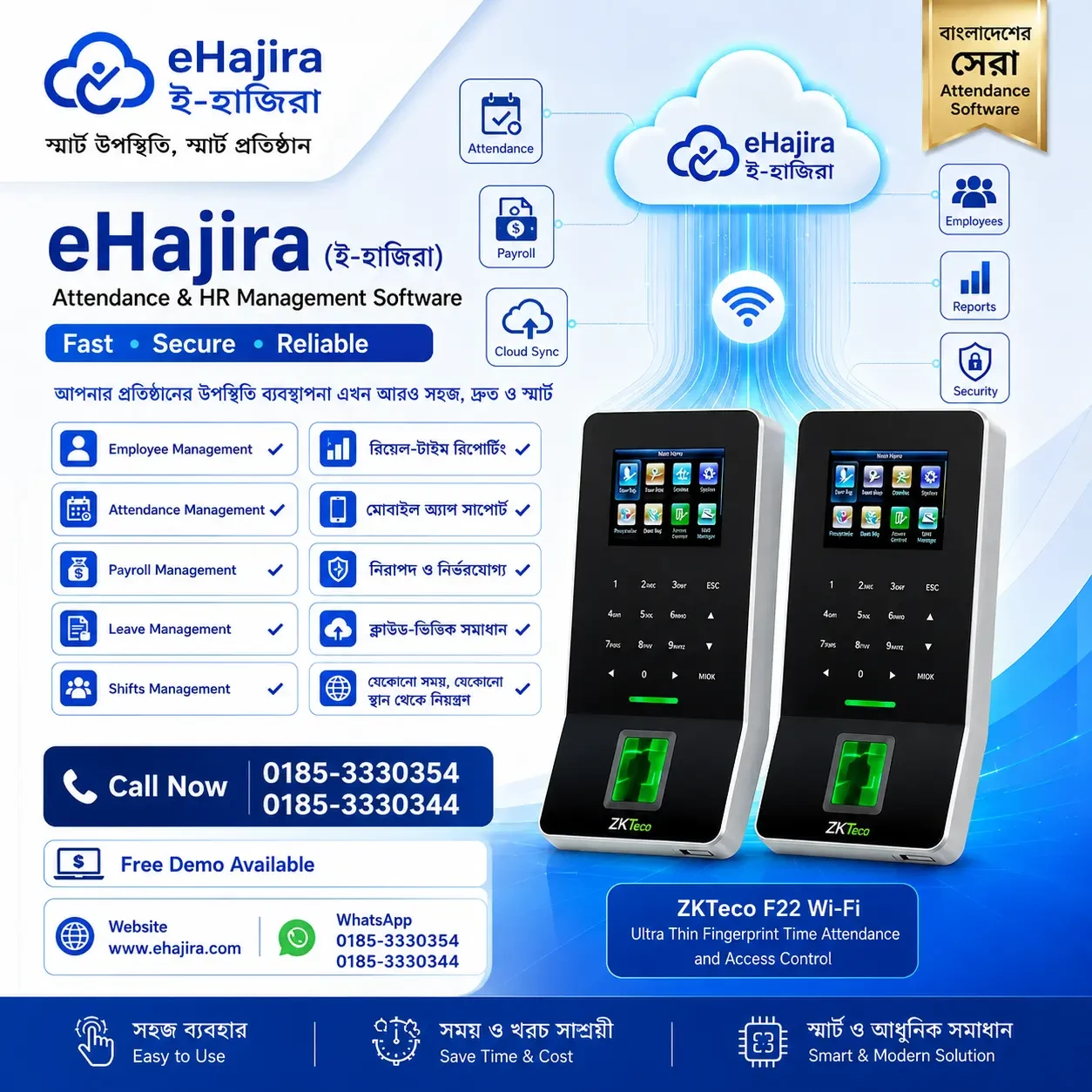
eHajira with ZKTeco F22 WiFi Access Control: A Complete Attendance and Security Solution for Bangladeshi Businesses
July 15, 2026
For most organizations in Bangladesh,
attendance tracking and physical access control are managed as two separate
problems: a fingerprint machine that logs who came in and out, and a door lock
or security guard that decides who is allowed to walk through. Running these as
disconnected systems means duplicated hardware, duplicated data entry, and gaps
that are only noticed after a payroll dispute or a security incident. The
pairing of eHajira with the ZKTeco F22 WiFi access control terminal was built
to close exactly that gap: one device at the door captures both who is entering
the building and when they arrived for work, and that single data stream flows
directly into eHajira for attendance, leave reconciliation, and payroll
processing.
This article looks at what the ZKTeco
F22 offers as a hardware terminal, how it integrates with eHajira's HR and
payroll platform, and why this combination has become a preferred choice for
Bangladeshi offices, factories, and retail operations that want dependable
access control without adding a second, disconnected attendance system.
The
Problem with Separate Attendance and Access Control Systems
Many small and mid-sized
organizations in Bangladesh still operate with a security guard managing entry,
a separate biometric or card-based attendance machine for HR purposes, and a
payroll process built around whatever data can be exported from that machine,
usually into an Excel sheet. This arrangement creates several recurring
problems:
•
Attendance
data has to be manually exported and reconciled with payroll each month,
introducing delays and transcription errors.
•
Physical
access is not tied to employment status, so a terminated employee's access card
or fingerprint may remain active well after their last working day.
•
There
is no single, auditable record connecting who physically entered a facility
with who was paid for that day's work — a gap that matters during compliance
audits or internal investigations.
•
Multiple
entry points or shifts require multiple devices that do not share data with
each other or with payroll.
A unified terminal-plus-software
approach removes each of these failure points by ensuring that the same event —
an employee presenting their fingerprint or card at the door — simultaneously
serves as both the access control decision and the attendance record that
eHajira uses for payroll.
What
Is the ZKTeco F22?
The ZKTeco F22 is a compact
fingerprint and access control terminal designed for standalone or networked
use at building or office entry points. It is positioned as an
entry-to-mid-range device suitable for organizations that need reliable
biometric verification without the cost of an enterprise-grade multi-door
security system. Typical characteristics of the F22 and comparable ZKTeco
terminals in this class include:
•
Fingerprint-based
verification with supplementary support for ID/IC card credentials, allowing
organizations to use either or both methods depending on their security policy.
•
A
built-in relay output that can directly control an electronic door lock, door
strike, or magnetic lock, allowing the device to function as an access control
unit and not just an attendance logger.
•
WiFi
connectivity in addition to standard TCP/IP (Ethernet) and USB connections,
which simplifies installation in locations where running a network cable to the
door is impractical.
•
A
colour TFT display and simple keypad or touch interface for enrollment,
verification feedback, and menu navigation.
•
Onboard
storage for a substantial number of fingerprint templates and transaction logs,
sufficient for small-to-mid-sized offices and single-site factories.
•
Support
for ZKTeco's ADMS (Automatic Data Master Server) push protocol, which allows
the device to automatically transmit attendance and access logs to a central
server over the network, rather than requiring someone to manually download
logs via USB.
Because it supports both access
control (via the relay and door lock integration) and attendance logging in the
same unit, the F22 is well suited to single-entry offices, small factory gates,
or branch locations where installing two separate systems would be unnecessary
and costly.
How
eHajira Integrates with the ZKTeco F22
1. Automatic Attendance
Sync
Once configured, the F22 pushes
attendance transactions — fingerprint or card scans at entry and exit — to
eHajira automatically over WiFi, using the device's networked communication
capability. HR staff do not need to manually export attendance logs or plug the
device into a computer; the data appears in the eHajira dashboard on its own
schedule, typically within minutes of the actual scan.
2. Unified Access and
Attendance Record
Because the same fingerprint scan
that unlocks the door also generates the attendance record used by eHajira,
there is no possibility of a mismatch between who physically entered the
premises and who is recorded as present for payroll purposes. This is particularly
valuable for organizations that need to demonstrate accurate, tamper-resistant
attendance records during labor compliance audits.
3. Real-Time Employee
Status Enforcement
When an employee resigns, is
terminated, or goes on extended leave, their access credentials can be
deactivated centrally in eHajira, and this status can be reflected at the F22
terminal, ensuring that physical access is automatically tied to current employment
status rather than requiring a separate, manual step to disable a departing
employee's fingerprint or card.
4. Multi-Shift and
Multi-Door Support
Organizations with rotating shifts or
multiple entry points can deploy multiple F22 units, each reporting into the
same eHajira account. This allows a factory with a main gate and a staff
entrance, or an office with multiple floors, to consolidate all attendance and
access data into a single payroll-ready record, rather than juggling logs from
several independent devices.
5. Overtime and Late-Entry
Flagging
Because entry and exit times are
captured precisely at the point of access, eHajira can automatically flag late
arrivals, early departures, and overtime hours based on configured shift rules,
rather than relying on HR staff to manually review timestamps against a roster.
Comparing
Deployment Approaches
Organizations typically choose
between three approaches when setting up entry-point attendance and access
control. The comparison below outlines how these compare when paired with
eHajira as the payroll and HR platform.
|
Consideration |
Manual Register / Guard Log |
Attendance-Only Biometric
Device (No Access Control) |
ZKTeco F22 + eHajira |
|
Door access control |
Manual, guard-dependent |
Not available; separate lock
system needed |
Integrated via relay-controlled
door lock |
|
Attendance accuracy |
Subject to human error and proxy
attendance |
Reliable, but requires manual
export |
Reliable and automatically
synced |
|
Data flow to payroll |
Fully manual re-entry |
Manual export/import |
Automatic push to eHajira via
WiFi/ADMS |
|
Employee offboarding |
Manual notice to guard |
Manual deactivation on device |
Centrally managed in eHajira |
|
Installation flexibility |
N/A |
Typically wired only |
WiFi option simplifies
installation at any entry point |
|
Audit trail for compliance |
Weak, paper-based |
Moderate, device-based logs |
Strong, centralized and
time-stamped in eHajira |
|
Cost for multi-door sites |
Low, but weak control |
Requires separate hardware per
system |
Scales with additional F22 units
on shared platform |
Where
This Combination Fits Best
The ZKTeco F22 and eHajira pairing is
particularly well suited to:
•
Small
and mid-sized offices with a single or limited number of entry points that want
access control tied directly to attendance and payroll.
•
Retail
outlets and branch locations where a compact, WiFi-enabled device avoids the
cost and disruption of running network cabling.
•
Factories
and warehouses with a defined staff entrance where management wants assurance
that door access and shift attendance are the same verified event.
•
Organizations
replacing a manual guard register or an outdated standalone biometric device
that does not communicate with payroll software.
Larger, multi-building campuses with
complex access hierarchies (multiple security zones, visitor management,
vehicle access) may eventually require a more extensive access control
architecture, but for the common case of controlling and recording entry at one
or a handful of doors, the F22 offers a proportionate, cost-effective solution.
Installation
and Setup Considerations
Deploying the F22 with eHajira
typically follows a straightforward sequence. The device is mounted at the
entry point and connected to power and, where used, the electronic door lock or
strike via its relay output. WiFi credentials are configured so the terminal
can communicate with the network without a dedicated Ethernet run to the door.
Employee fingerprints (and/or ID cards) are then enrolled directly at the
device or via an enrollment station, and employee records are matched to
corresponding profiles in eHajira. Once the device is registered to push data
via ADMS, attendance and access events begin flowing into eHajira
automatically, and administrators can configure shift rules, grace periods, and
overtime thresholds to match the organization's existing HR policy. As with any
new attendance hardware, running the system in parallel with the previous
process for one pay cycle is a sound way to confirm data integrity before fully
retiring the old method.
Reliability
and Maintenance
WiFi-based devices depend on stable
network coverage at the installation point, so it is worth confirming signal
strength at the door location before installation, particularly in factory
environments with metal structures that can weaken wireless signals. Where WiFi
coverage is inconsistent, the F22's wired TCP/IP connection remains available
as a fallback. Routine maintenance is limited mainly to keeping the fingerprint
sensor clean and ensuring firmware stays current, both of which are standard
practice for biometric terminals in any operating environment.
Conclusion
Attendance tracking and door access
control have traditionally been treated as separate purchases and separate
systems, even though they describe the same underlying event: an employee
arriving at work. Pairing the ZKTeco F22 with eHajira removes that artificial
separation, giving Bangladeshi businesses a single, WiFi-enabled terminal that
verifies identity, controls the door, and feeds accurate, automatic attendance
data directly into payroll. For organizations still relying on a manual guard
log, a standalone biometric device, or disconnected security and HR systems,
this integration offers a practical, cost-effective way to bring accuracy,
accountability, and centralized control to one of the most basic — and most
consequential — daily events in any workplace: the moment an employee walks
through the door.
Frequently Asked Questions
1. What
is the ZKTeco F22 used for?
The ZKTeco F22 is a fingerprint and
card-based terminal that verifies identity at an entry point, controls an
electronic door lock through its relay output, and logs attendance transactions
— combining physical access control and attendance capture in a single device.
2. Does
the F22 support WiFi, or does it need a wired network connection?
The F22 supports WiFi connectivity in
addition to standard wired TCP/IP and USB connections, which simplifies
installation at doors where running network cabling would be impractical.
3. How
does the F22 connect to eHajira?
The device pushes attendance and
access transactions to eHajira automatically over the network using ADMS
(Automatic Data Master Server) communication, so records appear in the eHajira
dashboard without manual export or USB transfer.
4. Can
the F22 control a door lock directly, or do we need separate access control
hardware?
The F22 includes a built-in relay
output that can directly drive an electronic door lock or strike, allowing it
to function as a standalone access control unit at a single entry point without
additional controller hardware.
5. What
happens when an employee leaves the company?
Employee status can be updated
centrally in eHajira, and access credentials tied to that employee can be
deactivated so that door access is automatically aligned with current
employment status.
6. Can
we use both fingerprint and card credentials on the same device?
Yes, the F22 supports fingerprint
verification alongside ID/IC card credentials, allowing organizations to choose
either method or use both depending on their security policy.
7. Is
the F22 suitable for factories with large workforces?
The F22 is well suited to a defined
staff entrance in factories and warehouses; very large workforces or multiple
simultaneous entry points may require deploying several F22 units, each
reporting into the same eHajira account for centralized data.
8. How
does this setup help with overtime calculation?
Because entry and exit times are
captured precisely at the point of access, eHajira can automatically flag late
arrivals, early departures, and overtime hours against configured shift rules,
without manual timestamp review.
9. What
happens if WiFi coverage at the door is weak?
The F22 also supports a standard
wired TCP/IP connection, which can be used as a fallback in locations where
wireless signal strength is inconsistent, such as certain factory environments
with significant metal structures.
10. Does
this integration help with labor compliance audits?
Yes. Because the same verified event
generates both the access control decision and the attendance record, the
resulting data in eHajira provides a centralized, time-stamped audit trail that
supports labor compliance and buyer social-compliance reviews.
11. How
many entry points can be managed under one eHajira account?
Multiple F22 units can be deployed
across different doors, gates, or floors, with all of them reporting into the
same eHajira account, allowing centralized management of attendance and access
across a site.
12. Is a
parallel run recommended before fully switching to this system?
Yes. As with any new attendance
hardware, running the F22 and eHajira alongside the existing process for one
payroll cycle is recommended to confirm data accuracy before retiring the
previous manual or standalone system.



.webp)